Jump to section
When you’re labeling complex multi-sensor data, issue tracking isn’t a luxury.
Yet, our previous functionality was limited. Reviewers could flag problems, but only through a single-line comment field. If the feedback wasn’t crystal clear, annotators wasted valuable time trying to figure out the exact problem.
Unclear comments meant annotators needed clarification. Annotators asked their team lead. The team lead asked the customer’s SPOC. The SPOC had to circle back again. Soon, the efficiency gained through advanced labeling was lost in endless clarification loops.
Until now.
We’ve shipped a major upgrade to issue tracking in Segments.ai. The goal: make issue tracking frictionless, reliable, and precise. Exactly what labeling complex, detailed datasets need.
This update combines two themes:
- Smoother, safer workflows — usability improvements that make issue tracking easier and more reliable.
- Optional precision tools — new ways to anchor issues to the exact element that needs attention.
Smoother, safer workflows
We cleaned up the basics, so working with issues is faster and less error-prone.
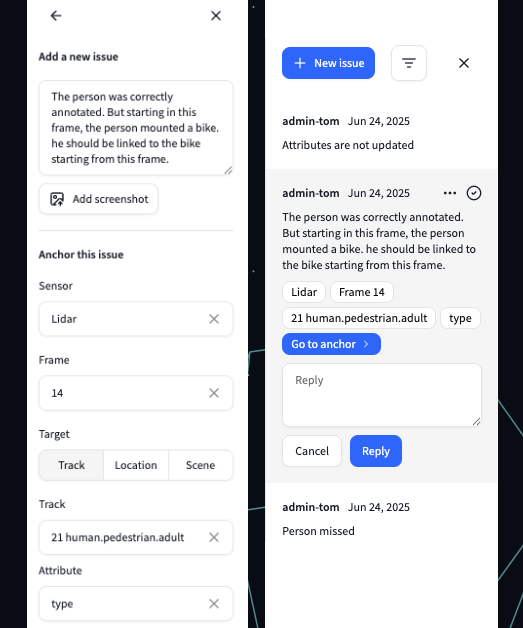
More precision when you need it
Sometimes a screenshot and a comment aren’t enough. This update adds optional tools for pointing directly at the problem.
Start creating issues
Just open any sample and click the issues button in the top bar to get started.
Need help? Check out our updated documentation for detailed guides and tips. And as always, we’re eager to hear your feedback. Reach out through your Slack channel or drop us a note.